v4.2.102026-08-12
RedCarbon v4.2.10 Changelog
Features
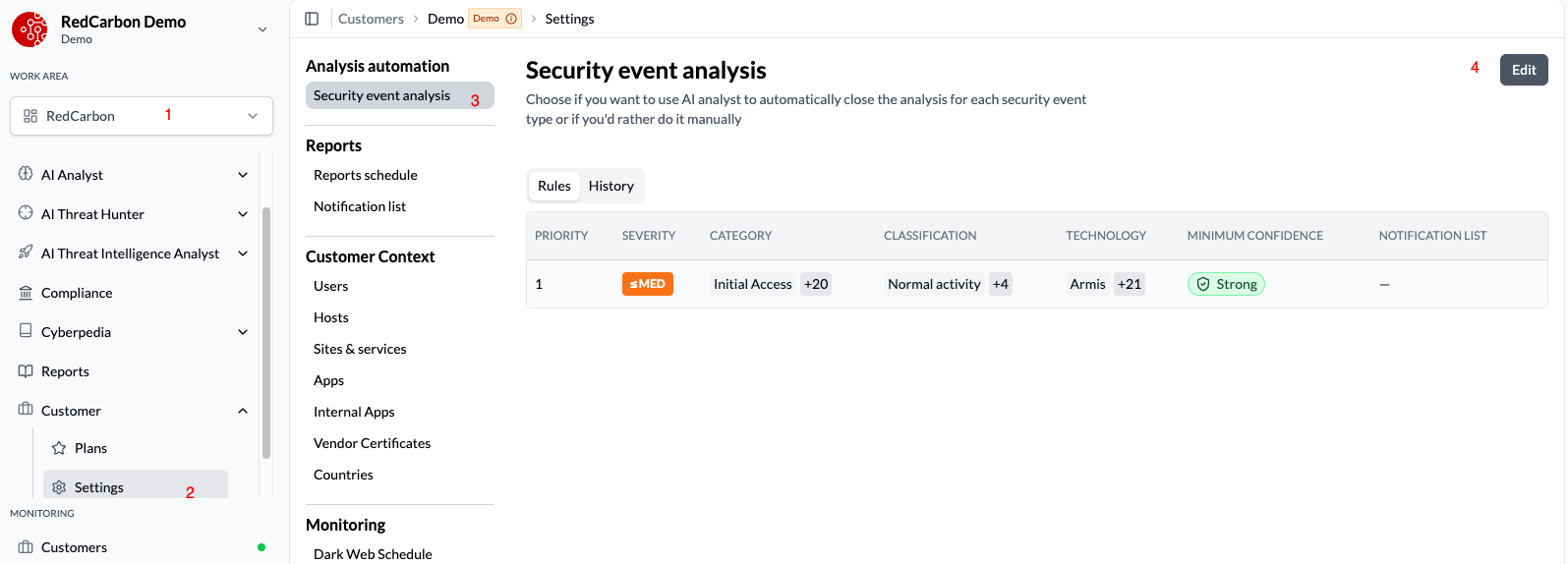
- New console experience for security event analysis — the configuration screen and the case view have both been redesigned. This is the standard experience going forward; customers not yet migrated stay on the legacy screens until they are.
-
Rules is the new configuration screen. It lists the rules that decide how security events are analysed: a rule matches events, sets their severity, and sets the confidence the AI must reach before acting. Rules are ordered by priority (drag to reorder) and the first match wins. Every edit is kept as a revision, with who changed what and when.
-
The AI analysis card on a case has been rebuilt: the checks the AI ran, the time gained, one grouped recommendation, and the confidence reached for that case — Strong, Moderate or Limited. Cases with no recorded confidence show no confidence block.
-
- Google SecOps Chronicle ingestion — Chronicle can now be configured as a source, including Products and Environments ingestion filters so large tenants can narrow what gets ingested.
- LogRhythm SIEM ingestion — LogRhythm can now be configured as a source end to end.
- Integrations — Verify now tests what is on screen — when adding or editing a source under Configuration → Integrations, the Verify button used to check the credentials alone, ignoring the rest of the form. It now sends the same credentials and configuration that Save would, so a source that verifies actually works. This fixes verification for FortiSIEM, Fortinet EDR, Palo Alto XDR, QRadar and Trend Micro XDR.
UI/UX Improvements
- Generated report tables and the ticket email now show address, location and threat verdict for each IP, so an unfamiliar address can be placed without leaving the report.
- Report emails render correctly again: paragraphs and tables inside tables and conclusion wrappers, typography matching the console, and readable status badges.
- The remaining older tables in the console now use the same table component as everywhere else, so sorting, pagination and row layout behave consistently across every screen. Two long-standing annoyances went with them: rows that refused to expand when clicked, and cell content sitting against the top edge of tall rows.
- The Monitoring entries in the sidebar are now proper links, so they can be opened in a new tab and highlight the page you are on, like every other sidebar entry.
Bug Fixes
- A user whose only customer is archived now sees the empty-access screen instead of being dropped into a broken customer.