Groups
This article explains how to use groups to manage user visibility and permissions efficiently.
Overview
Groups allow you to organize users and control their visibility over customers and other users. Each group defines which customers and users its members can see within the platform.
Creating a Group
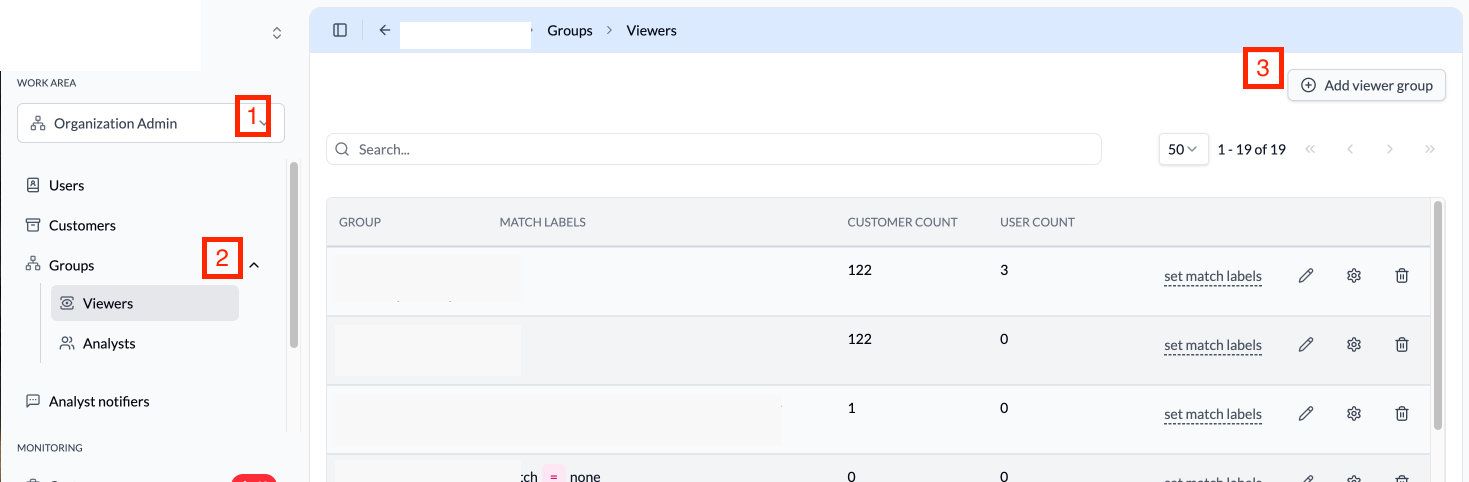
The Groups page shows all configured groups with their match labels, customer count, and user count. To create a new group:
- Navigate to
Organization Adminin the sidebar. - Expand the
Groupssection to see group types (Viewers, Analysts). - Click
Add viewer grouporAdd analyst groupto create a new group. - Enter a name for the group.
- Add a description to help identify the group's purpose.
- Select the customers that group members can view.
- Select the users that will be members of this group.
- Click
Saveto create the group.
Managing Groups
Editing a Group
To modify an existing group:
- Navigate to
Organization Admin>Groups>ViewersorAnalysts. - Find the group you want to modify.
- Click the edit icon next to the group.
- Update the group name, description, or associations:
- Name: Change the group's display name.
- Description: Update the group's purpose description.
- Customers: Modify which customers are visible to group members.
- Users: Modify which users are visible to group members.
- Click
Saveto apply the changes.
Deleting a Group
To delete a group:
- Navigate to
Organization Admin>Groups>ViewersorAnalysts. - Find the group you want to delete.
- Click the delete icon next to the group.
- Confirm the deletion.
Match Labels (Advanced)
Groups support match labels for advanced configuration. Match labels allow you to automatically associate resources with groups based on metadata labels, enabling dynamic group membership without manual configuration.
Best Practices
- Use Descriptive Names: Name groups clearly to indicate their purpose.
- Document Group Purposes: Add descriptions to help administrators understand each group's role.
- Regular Reviews: Periodically review group memberships to ensure appropriate access.
- Principle of Least Privilege: Configure groups with the minimum visibility needed for the job function.