Webhooks
Webhooks provides a way for notifications to be delivered to your server in real time whenever an event occurs on RedCarbon.
Setting up a Webhook
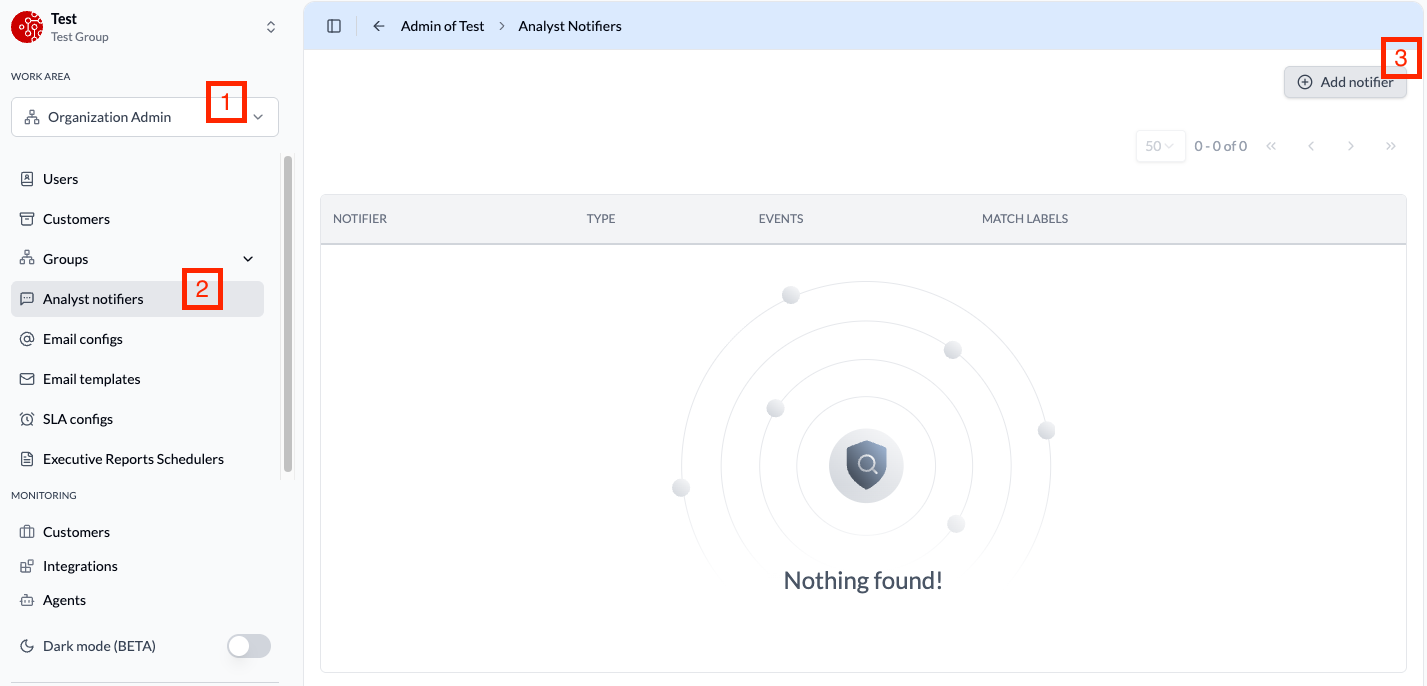
To create a webhook, you must have the Organization Admin role. Follow these steps:
- Navigate to Organization Admin > Analyst Notifiers.
- Click Add Notifiers and select Webhook.
- Configure the webhook URL
Filtering with Match Labels
Once a webhook is created, you can configure match labels to filter which events are delivered. For example, you can use match labels to receive events only for a specific customer, allowing you to route different customers' events to different endpoints.
Event Structure
Every webhook delivery contains an event envelope with the following structure:
{
  "eventId": "evt_2fGh7kL9mNpQ",
  "type": "ticket.created",
  "customerId": "cust_8xR3vB5nW",
  "timestamp": "2024-03-15T14:22:00Z",
  {{event}}: { ... }
}
| Field | Type | Description |
|---|---|---|
eventId | string | Unique identifier for the event |
type | string | The event type (see Event Types below) |
customerId | string | The customer associated with the event |
timestamp | string | ISO 8601 timestamp of when the event occurred |
{{event}} | object | Can be either ticketEvent (see Case Events) or iocEvent (see IOC Events) |
Only one of ticketEvent or iocEvent will be present in each event, depending on the event type.
Event Types
Case Events
| Event Type | Description |
|---|---|
ticket.created | A new case has been created |
ticket.updated | A case has been updated (status, severity, tier, category, classification, spent time) |
ticket.assigned | A case has been assigned to an analyst |
ticket.unassigned | A case has been unassigned from an analyst |
ticket.closed | A case has been closed |
ticket.reopened | A previously closed case has been reopened |
ticket.escalated | A case has been escalated |
ticket.notify | A notification has been sent for a case |
ticket.parent.set | A parent case has been linked |
ticket.parent.unset | A parent case has been unlinked |
ticket.note.created | A note has been added to a case |
ticket.report.change | A case report has been created or updated |
ticket.comment.created | A comment has been added to a case |
For detailed payload structures and examples, see Case Events.
IOC Events
| Event Type | Description |
|---|---|
ioc.created | A new Indicator of Compromise has been created |
For detailed payload structures and examples, see IOC Events.
Validating webhook deliveries
When you create a webhook channel, RedCarbon provides a secret token (a base64-encoded string, ~86 characters). This token is shown only once — if you lose it, you must delete the channel and create a new one. Store it as a secret environment variable.
RedCarbon signs every outgoing webhook with HMAC-SHA256. Each request includes a RedCarbon-Signature header:
RedCarbon-Signature: t=1708262400000, v1=3d9f2ca4e1b7...a8b1
| Field | Description |
|---|---|
t | Unix timestamp of the event in milliseconds |
v1 | Lowercase hex-encoded HMAC-SHA256 signature |
To verify a request:
- Extract
tandv1from theRedCarbon-Signatureheader. - Read the raw request body before any JSON parsing — parsing and re-serializing can change bytes and invalidate the signature.
- Build the signed string:
"{t}.{raw_body}". - Compute
HMAC-SHA256(secret_token, signed_string)and hex-encode it. - Compare the result with
v1using a constant-time equality check to prevent timing attacks. - Reject requests where
|now − t| > 5 minutesto prevent replay attacks.