Microsoft 365 Defender
This guide explains how to integrate Microsoft 365 Defender (Microsoft Defender XDR) with RedCarbon.
Overview
The Microsoft 365 Defender integration allows RedCarbon to ingest incidents and alerts from the unified Microsoft XDR platform, including Defender for Endpoint, Identity, and Office 365.
- Vendor Documentation: Microsoft 365 Defender Incidents API
Configuration
To configure the integration, you need to register an application in Azure Active Directory (Entra ID) and grant it permissions to access Microsoft 365 Defender APIs.
Step 1: Register an Application
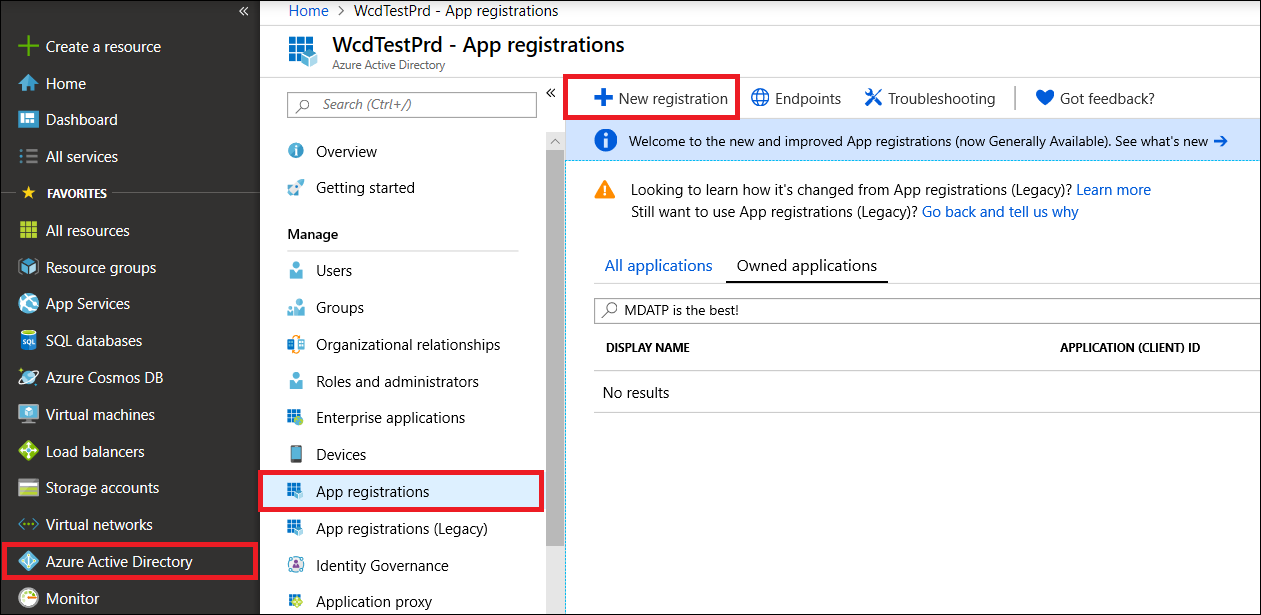
- Log in to the Azure Portal with an account that has the Global Administrator role.
- Navigate to Azure Active Directory > App registrations > New registration.
- Enter a name (e.g.,
RedCarbon-Defender). - Click Register.
Step 2: Grant API Permissions
-
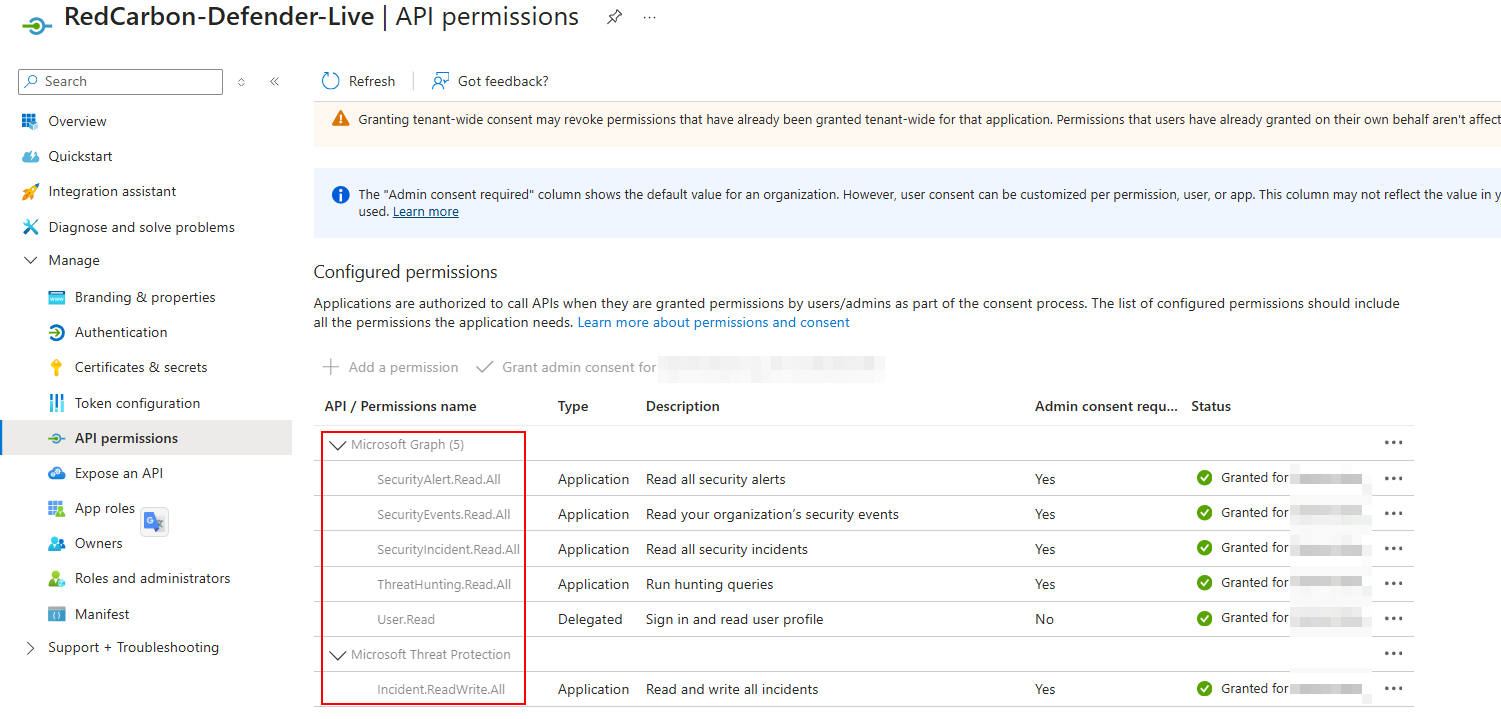
On the application page, select API Permissions.
-
Click Add permissions and add the following permissions.
-
Check the table API/Permissions name.
-
Check that the following permissions in Microsoft Graph are enabled:
SecurityAlert.Read.All— Reads alerts from Microsoft Defender XDR (Endpoint, Identity, Office 365, and Cloud Apps) in a unified format. This is the primary permission for the Alerts v2 API.SecurityIncident.Read.All— Reads Incidents, which are containers that group related alerts together to show the full timeline of an attack. Using incidents is the recommended approach to avoid alert fatigue.ThreatHunting.Read.All— Executes KQL (Kusto Query Language) queries against raw event data such as process creations and network connections stored in Microsoft Defender XDR, providing deeper access than alert-level data.
-
Check that the following permissions in Microsoft Threat Protection are enabled:
Incident.ReadWrite.All— Reads and modifies incidents. Required if RedCarbon needs to ingest and update incidents, change their severity, or assign them to SOC analysts via the API.
-
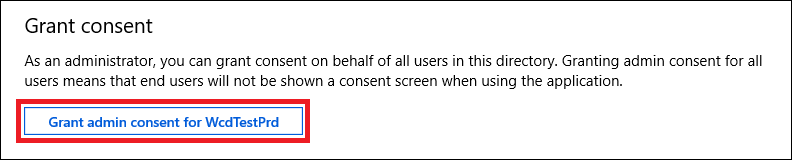
Important: Click Grant admin consent for [Organization Name] to activate the permissions.
Step 3: Create a Client Secret
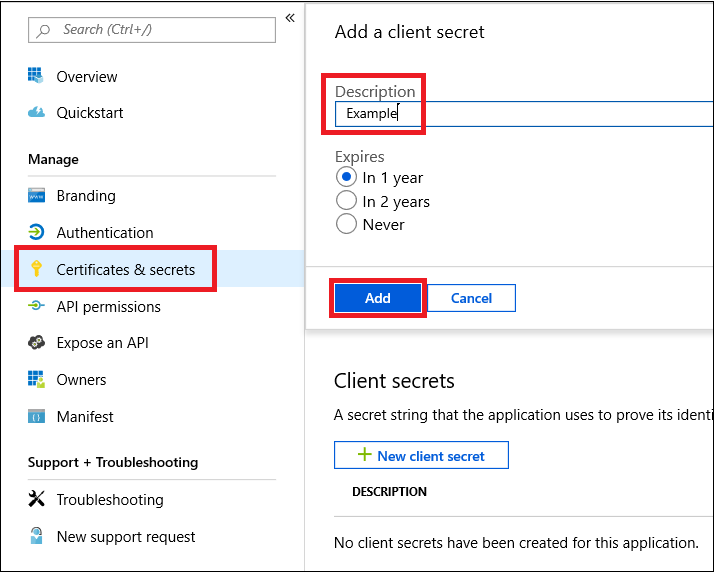
- Navigate to Certificates & secrets.
- Click New client secret.
- Add a description and expiration period.
- Click Add.
- Copy the Secret Value immediately.
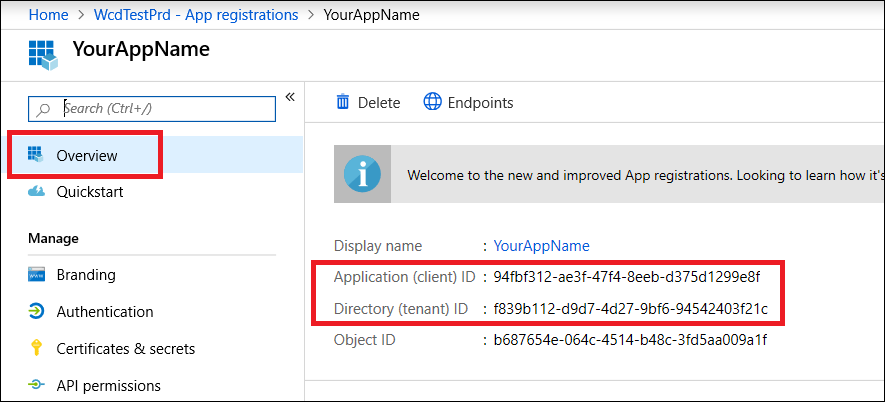
Step 4: Gather Required IDs
From the Overview page of your application, copy:
- Application (Client) ID
- Directory (Tenant) ID
Step 5: Configure RedCarbon
-
Log in to the RedCarbon Dashboard.
-
Navigate to the customer's Integrations page.
-
Select Microsoft 365 Defender.
-
Paste the Tenant ID, Client ID, and Client Secret.
-
Configure the optional ingestion settings:
Field Default Description Product Incidents Set to alertsto ingest standalone alerts instead of incidents.Product Filters All sources Restrict ingestion to specific service sources. In incident mode, drops incidents whose alerts don't match any listed source. In alert mode, filters directly via an OData query. Valid service sources for Product Filters:
microsoftDefenderForEndpointmicrosoftDefenderForIdentitymicrosoftDefenderForCloudAppsmicrosoftDefenderForOffice365microsoft365DefenderazureAdIdentityProtectionmicrosoftAppGovernancedataLossPreventionmicrosoftDefenderForCloudmicrosoftSentinelmicrosoftThreatIntelligence
-
Click Save and then Test.
Severity Mapping
| Original Severity | RedCarbon Score |
|---|---|
| Informational | 0 |
| Low | 10 |
| Medium | 40 |
| High | 70 |
| Critical | 90 |