Darktrace
This guide explains how to integrate Darktrace with RedCarbon.
Overview
The Darktrace integration allows RedCarbon to ingest AI Analyst events, AI Analyst incident groups, and model breach alerts from your Darktrace instance.
Configuration
To configure the integration, you need to generate API tokens from your Darktrace instance.
Step 1: Generate API Tokens
- Log in to your Darktrace instance with an administrator account.
- Navigate to System Config > API Keys.
- Click Generate New API Key.
- Copy both the Public Token and the Private Token and store them securely — they will not be shown again.
Note: The API tokens are used to sign every request with an HMAC-SHA1 signature. Keep the private token secret and never share it.
Step 2: Configure RedCarbon
- Log in to the RedCarbon Dashboard.
- Navigate to the customer's Integrations page.
- Select Darktrace.
- Enter the following credentials:
- Darktrace URL: the base URL of your Darktrace instance (e.g.,
https://my-instance.darktrace.com) - Darktrace Public Token: the public token generated in Step 1.
- Darktrace Private Token: the private token generated in Step 1.
- Darktrace URL: the base URL of your Darktrace instance (e.g.,
- Click Verify credentials to confirm the connection.
- Under Configuration settings, set the following:
- Minimum score: the minimum alert score to ingest (recommended:
50). Alerts below this threshold will be ignored. - Products: select the Darktrace data types to enable (see Products below).
- Minimum score: the minimum alert score to ingest (recommended:
- Click Save.
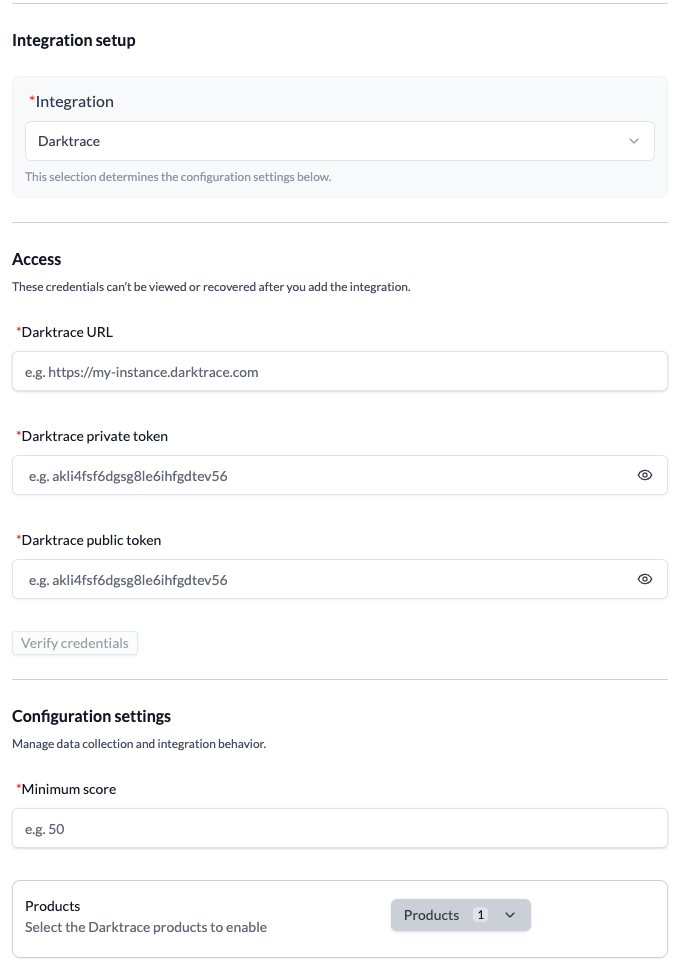
Products
The Products setting controls which types of Darktrace data RedCarbon ingests. You can enable one or more of the following:
| Product | Value | Description |
|---|---|---|
| AI Analyst Events | event | A set of anomalies or network activity investigated and reported by Darktrace's Cyber AI Analyst. Each event is the result of the AI Analyst reviewing model alerts and identifying patterns of concern on one or more devices. Enabled by default when no products are selected. |
| AI Analyst Groups | group | Incidents comprised of one or more AI Analyst events. Events with linking factors (shared devices, credentials, or activity) are grouped into a single incident, which can expand over time as new connections are discovered. Useful for tracking the full scope of an investigation. |
| Model Breaches | modelbreach | Alerts triggered when a device's behaviour breaches a Darktrace model (rule). The primary endpoint for SOC integrations — returns a time-sorted list of model alerts with full device context. More granular and higher-volume than AI Analyst events. |
Note: If no products are selected, RedCarbon defaults to ingesting AI Analyst Events only.
Minimum Score
The Minimum score setting filters out low-confidence alerts. It accepts a value between 0 and 100:
0— all alerts are ingested regardless of confidence level.50— only medium-to-high confidence alerts are ingested, reducing noise.100— only the highest-confidence alerts are ingested.
The minimum score applies to all three products. The value is interpreted as follows per product:
| Product | Score scale | Darktrace response field | Example: value 50 |
|---|---|---|---|
| AI Analyst Events | 0–100 | aiaScore | ingests events with score ≥ 50 |
| AI Analyst Groups | 0–100 | groupScore | ingests incidents with score ≥ 50 |
| Model Breaches | 0–100 (sent as 0.0–1.0) | percentscore | ingests breaches with percentscore ≥ 50 |
Note: AI Analyst incident scores can increase over time as new events with more severe behaviour are added to an incident.
What RedCarbon ingests
| Data type | Darktrace source | Description |
|---|---|---|
| AI Analyst Events | /aianalyst/incidentevents | Anomaly clusters investigated and reported by the Cyber AI Analyst engine, filtered by minimum score. |
| AI Analyst Groups | /aianalyst/groups | Incidents grouping one or more AI Analyst events. Incidents can merge over time as shared factors link disparate activity. |
| Model Breaches | /modelbreaches | Rule-based breach alerts with full device context and triggered component details, filtered by minimum score. |